
Excellence Score
When couriers understand the rules, everyone wins.
How redesigning a single page increased the average Excellence Score from 3.5 to 4.3 and improved service quality across Glovo’s highest-competition markets.
Glovo – OCT 2023 – 3 months – iOS & Android
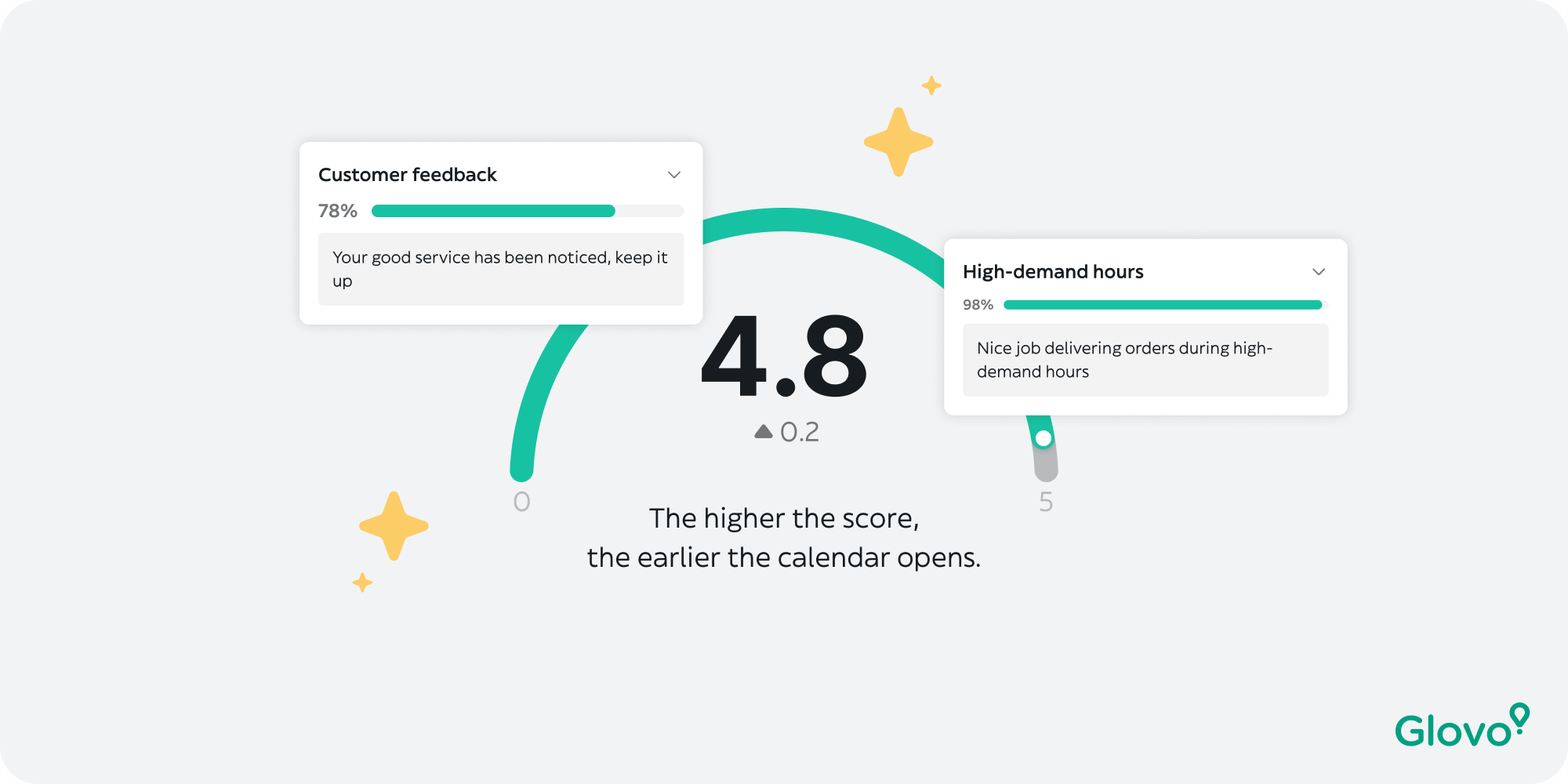
+18%
+0.6
+79%
The team
The Quality & Compliance team aims to optimize couriers’ performance by encouraging best practices and preventing abuse.
My Role
I worked on this project from end to end in collaboration with a PM, a Content Designer, a UX Researcher, five engineers, and one data analyst.
Context
A feature that affects every courier’s income, barely understood by anyone
The Excellence Score is a number out of 5 that ranks couriers when they try to book delivery slots. The higher your score, the earlier you get to pick your working hours. In highly competitive markets — where hundreds of couriers fight for the same peak-hour slots — it’s not just a feature. It determines whether you work a profitable shift or get leftover time blocks.
The score is calculated from seven performance metrics, measured over a rolling 28-day window, and updated every morning. Each metric carries a different weight. Miss on any one of them, and your score drops — quietly, without explanation.
“The score exists in markets where courier competition is highest — precisely because quality of service matters most at peak hours. It is a core lever for fleet performance. But it only works if couriers understand it.”
Discovery
We thought the problem was design. It was deeper than that.
Together with the UX Research team, we started with an audit of the existing experience and a series of user interviews. We expected to find visual issues — unclear labels, poor hierarchy. What we found was more fundamental.
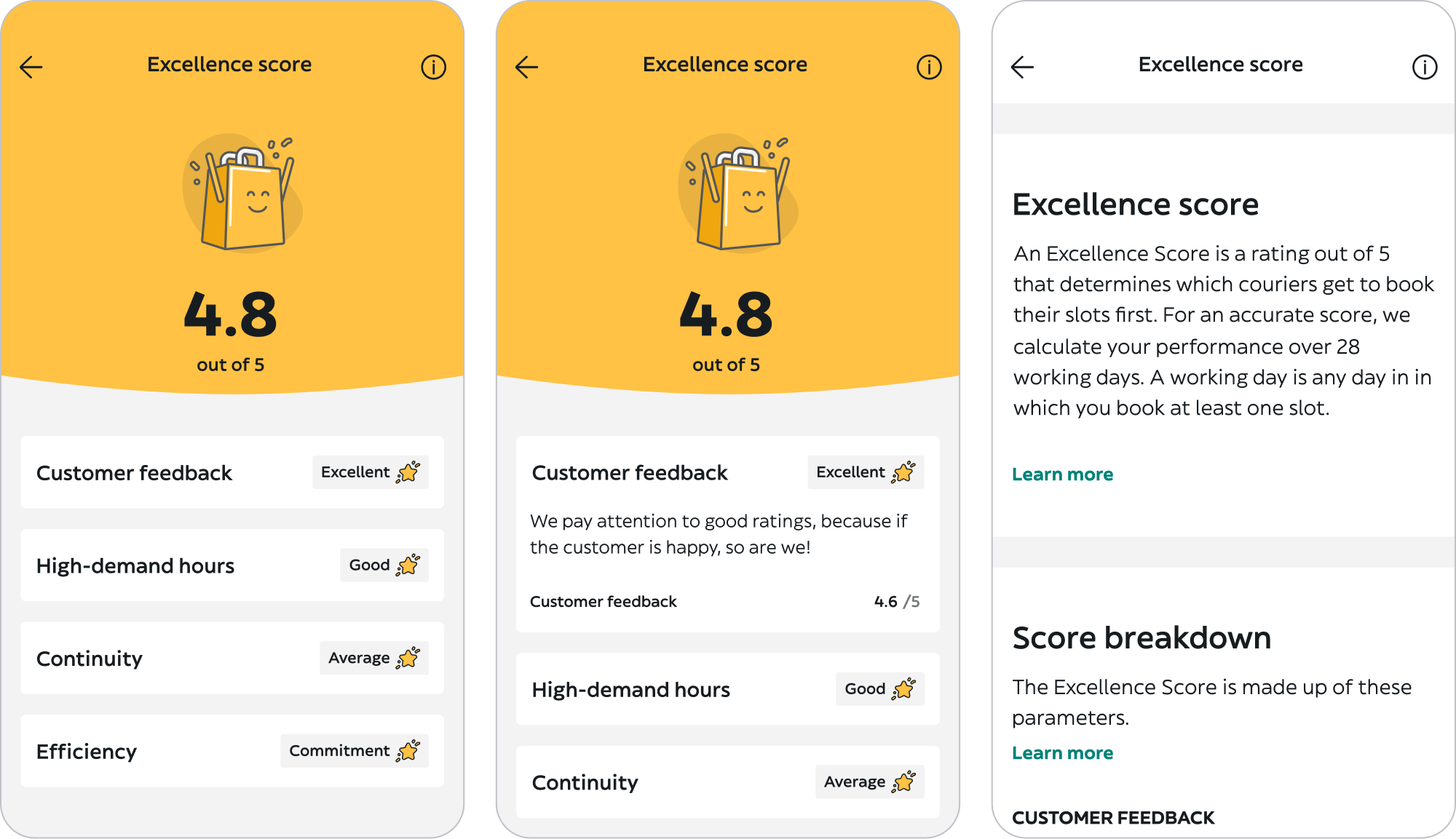
State of the Excellence Score design at the time the project was launched
The real problem was that the formula itself is genuinely complex. Seven independent metrics. Different calculation windows. Different weights. And the only thing couriers saw was a single number — with no path to improvement, no explanation of what changed, and no connection to when they could book their next shift.
Comprehension
Couriers couldn’t name more than 2–3 of the 7 metrics affecting their score, even after months on the platform.
Motivation
There was no indication of score direction — better or worse. Couriers had no idea if their behaviour that week was helping.
Priority
All metrics appeared equally important. Couriers couldn’t tell where to focus their effort when time was limited.
Connection
Most couriers didn’t connect the Excellence Score to their calendar booking time. These felt like two separate systems.
One data point made the business case impossible to ignore: “Fairness and clarity of the scoring system” was the 3rd biggest dissatisfaction driver on the platform, with 29% of couriers actively unhappy. For a metric that directly determines earning potential, that number was untenable.
Problem statement
“Couriers check their Excellence Score every day — but don’t understand how it’s calculated, don’t know how to improve it, and have no visibility into when it unlocks their booking window. A system meant to motivate quality is instead generating confusion and frustration.”
Constraints & Scope
What we couldn’t touch —
and what that forced us to do.
Before ideation started, the boundaries were set. Two constraints shaped every design decision that followed.
Hard technical constraint
The formula could not be changed. Engineering had made it clear early: the scoring algorithm was off the table. Seven metrics, their weights, and their calculation logic were fixed. We couldn’t simplify what we measured — only how we communicated it. The challenge was making a genuinely complex formula feel legible without dumbing it down or misrepresenting it.
Scope constraint
3 months, one screen. An early conversation with the PM established the priority: focus entirely on the Excellence Score page. Surface-level fixes in the delivery flow — like real-time performance nudges — were scoped out as a future iteration. This was the right call: the page was where couriers went when they had questions. It needed to answer them fully before we extended the experience elsewhere.
These constraints weren’t obstacles — they were focus. Instead of trying to fix the system, we had to design the clearest possible window into it.
Ideation
Three workshops. One question:
how do you explain complexity without hiding it?
I facilitated three ideation sessions with a cross-functional group — PM, Content Designer, UX Researchers, fellow Designers, and Engineers. Starting with engineers early was intentional: understanding what data was available in real time (and what wasn’t) shaped which design directions were viable before we fell in love with them.
1st: Reverse brainstorming
Instead of asking “how do we fix this?”, we started by asking “how would we make this even more confusing?” Reversing the question surfaced problems we’d been too polite to name directly — like the fact that our metric names were written for operations teams, not for couriers on the street.

Identified solutions:
→ Clarify the explanation of the parameters using concise, easy-to-understand sentences and visuals
→ Highlight the opening time of the booking calendar
→ Accompany the numerical score with a more intuitive representation
→ Introduce a comparison feature to benchmark courier performance
→ Provide comprehensive onboarding to educate couriers about the system
→ Inspire couriers to excel by employing motivational messages
→ Offer tailored feedback and suggestions based on individual performance
→ Offer a daily update with a clear history of performance trends
2nd: Six to one
Each participant sketched 6 interface directions in 5 minutes, then we converged on 1. This forced speed and divergence before convergence — preventing the group from anchoring on the first idea that sounded reasonable.
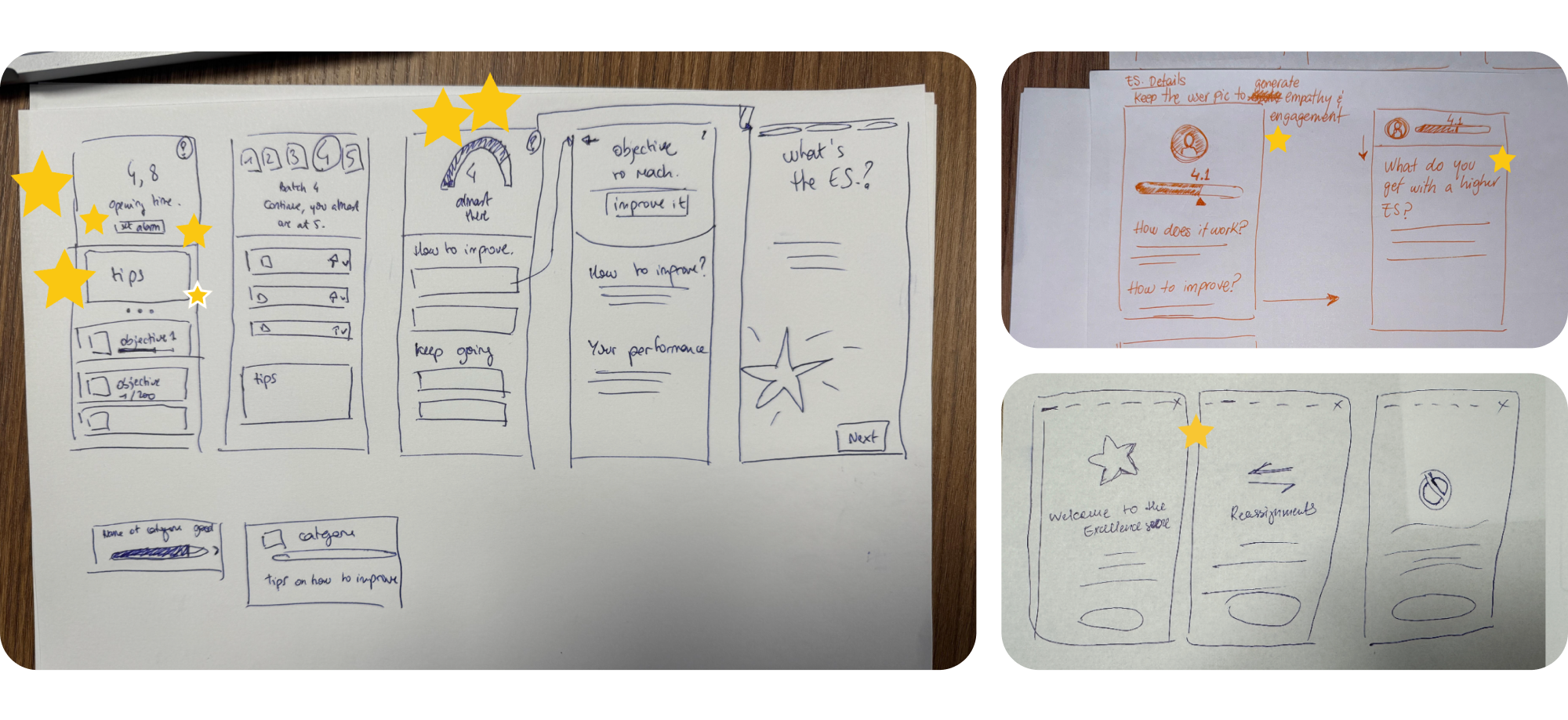
Pair designing
The hardest problem wasn’t layout — it was language. Each metric needed a short, plain-language explanation that was both accurate and actionable. I co-designed this with the Content Designer from the wireframe stage, not as a handoff at the end. Getting the words right changed the shape of the UI.
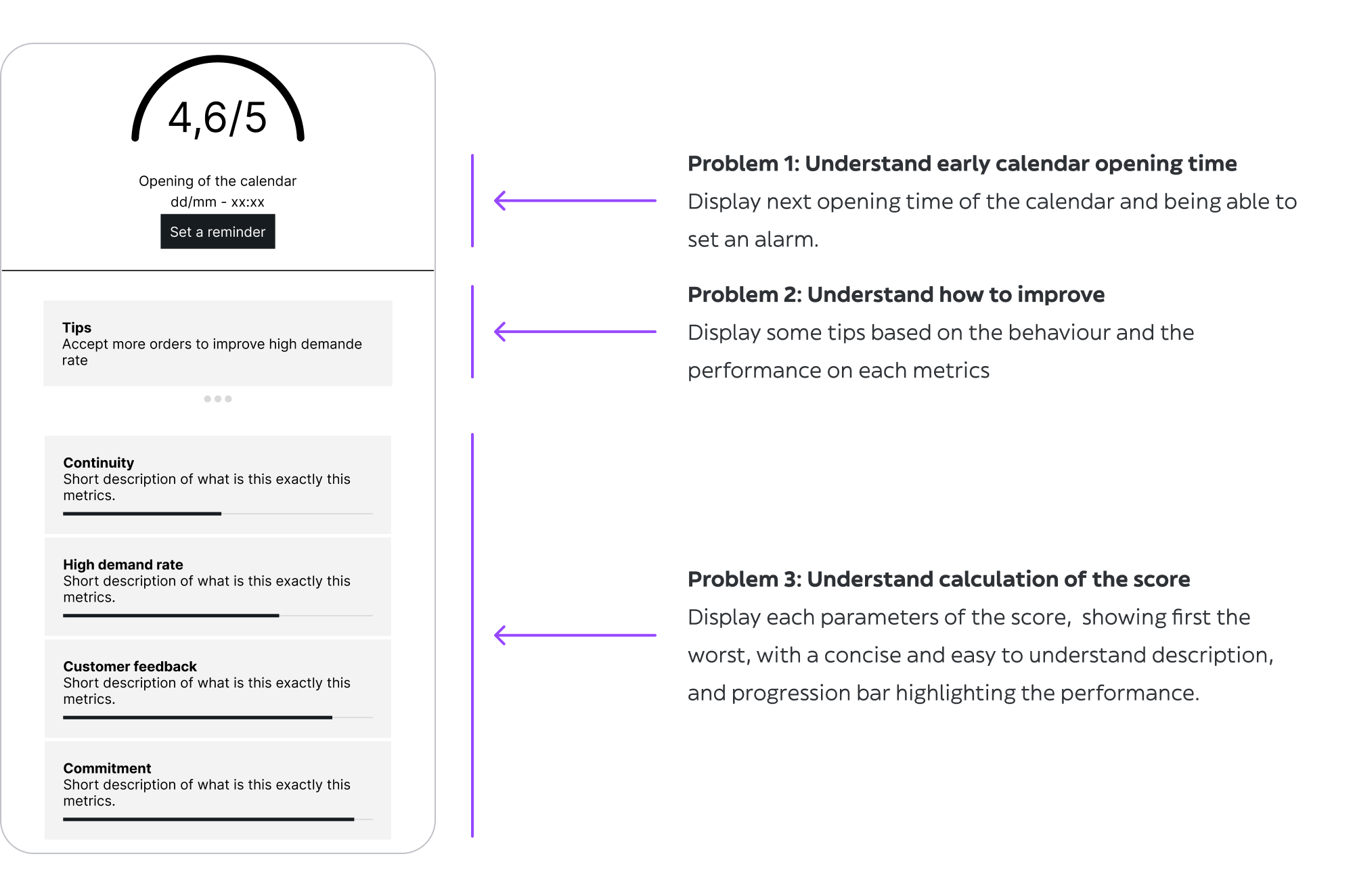
One of the most debated questions: should we show the booking time directly on this page? Technically it was available. But it meant surfacing information that lived in the Calendar section in a place couriers came to for score information. The decision was yes — because couriers already connected the two mentally, just without any help from the product
Testing
Poland was the right market.
Here’s why that mattered.
We ran 7 usability tests in Poland. That choice was deliberate, not a budget shortcut. Poland is one of Glovo’s most competitive markets — high courier density, significant pressure on peak-hour slots, and one of the highest rates of Excellence Score usage. If the design worked there, it would transfer.
We split the sample: 3 new couriers (less than 1 month on the platform) to test baseline comprehension, and 4 experienced couriers (around 6 months) to test satisfaction and whether the new design felt like a meaningful improvement over what they already knew.
Validated
✅ General content and metric descriptions were well understood
✅ Progress bars helped couriers identify what to improve
✅ Tips were perceived as motivating, not punitive
✅ Showing the booking time on this page felt useful and clarifying
Required iteration
❌ Couriers didn’t understand when the score updates (daily, every morning)
❌ Some metric descriptions still needed clearer language
❌ Onboarding was too long — most couriers skipped it
❌ The alarm concept felt like extra work; push notification preferred
The update timing issue was the most important finding. Couriers were interpreting their score in real time — expecting it to change after each delivery. When it didn’t, they thought it was broken. We added a clear, permanent indicator showing when the score was last updated and when the next update would occur. A small fix with significant trust implications.
Key Decisions
The choices that defined the design
Not every solution we generated made it through. Here are the decisions that shaped the final product — and why we made them.
Decision 01 — How to represent each metric
A single aggregate bar for the overall score → Individual progress bars per metric, with tips to improve each one
Decision 02 — How to notify couriers about their booking window
In-app alarm / reminder they set manually → Push notification sent automatically when booking opens
Decision 03 — How much onboarding to include
Full onboarding explaining all 7 metrics in detail → Short onboarding focused on the core principle; details available inline
Final Design
Clarity without oversimplification
The final UI was built on Glovo’s Design System, with new components introduced where the existing library couldn’t support the interaction patterns we needed — particularly the per-metric progress bars and the booking time reminder module.
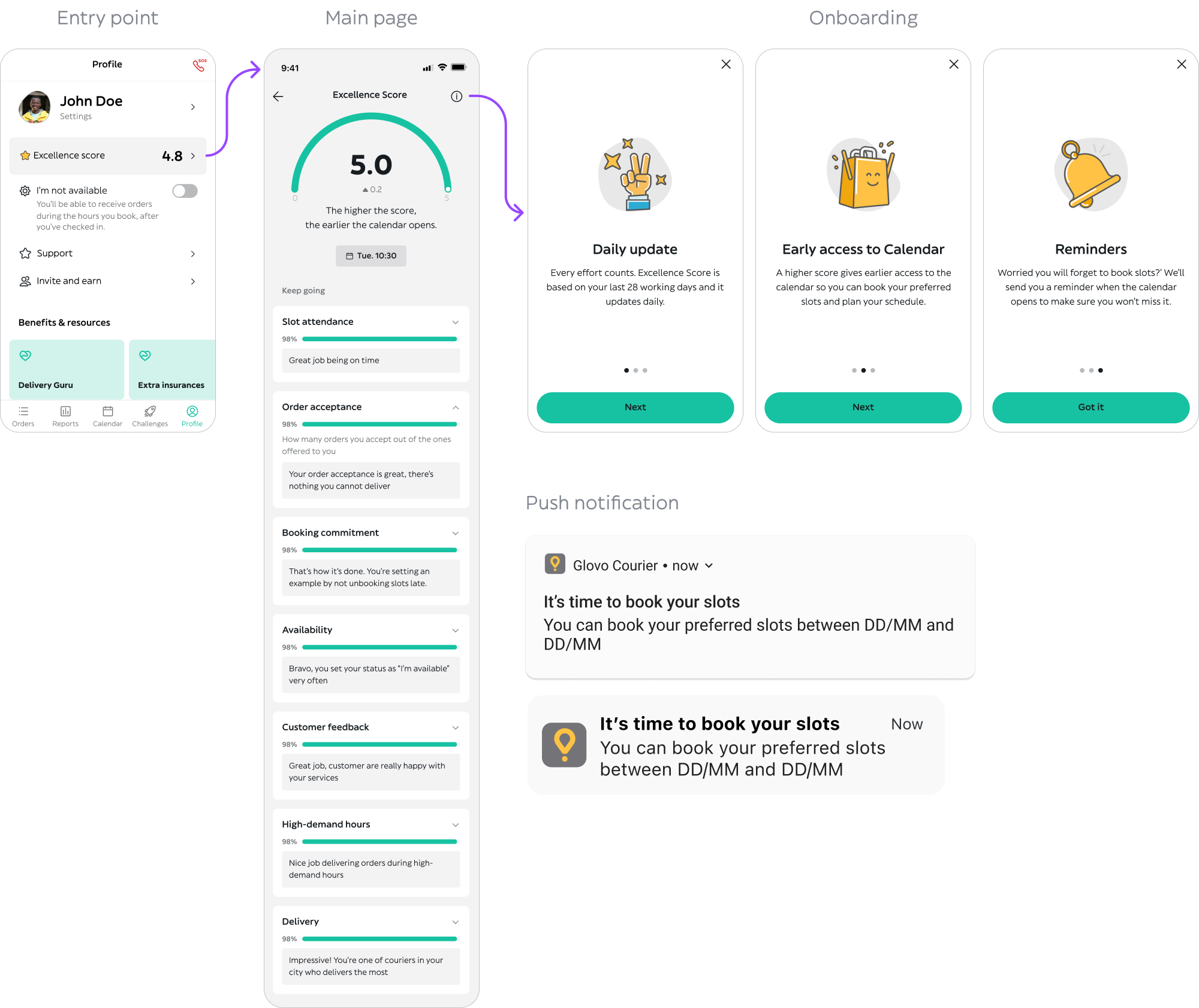
Happy path
Experienced couriers with a full 28-day history. Score is visible, booking time is surfaced, each metric shows a progress bar and a specific tip.
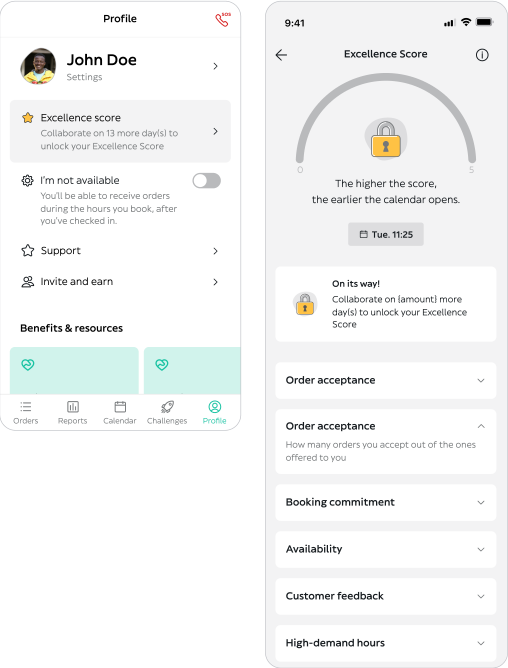
Edge case – Newbies
Couriers in their first 28 days don’t have enough data for a full score calculation. We designed a transitional state that explains what the score will be based on, and encourages them to build good habits from the start rather than leaving them with a confusing empty state.
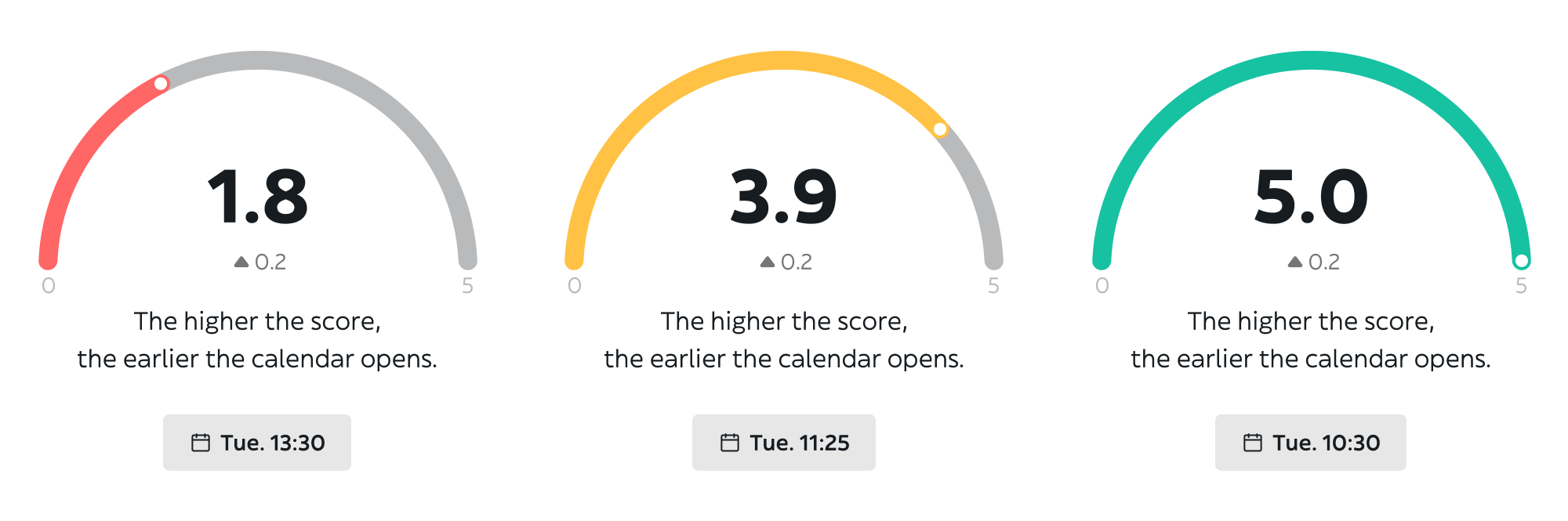
Score progress bar and calendar opening time reminder
A persistent indicator showing the last update time and when the next one happens. Unglamorous to design. Essential for trust.
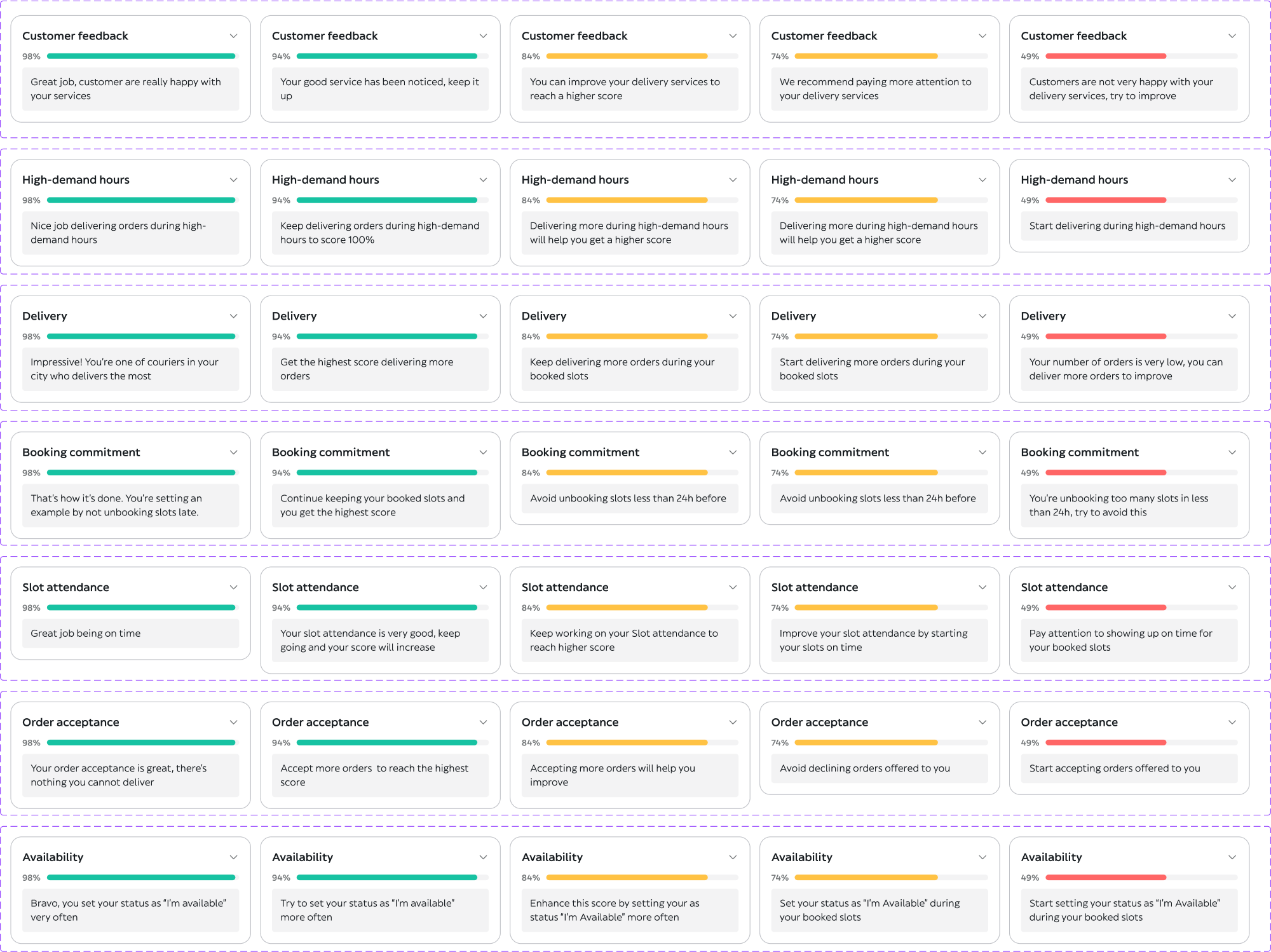
Parameters and tips
Handoff
Development was divided into 3 sprints. Design deliverables were tailored to each sprint to give engineers clear, incremental guidance rather than one monolithic handoff.
Results
The score went up.
Because couriers finally understood it.
Impact was measured through two parallel mechanisms: an A/B test comparing the new design against the existing one, and an embedded quick-feedback screen to capture real-time satisfaction signals from couriers.
79%
Users understand how the Excellence Score works
vs. 61%
4.3/5
Global average excellence score
vs. 3.5/5
The +0.8 average score increase is the result I’m most proud of. It’s not a satisfaction metric or a perception shift. It means couriers were actually performing better across the platform — fewer cancelled orders, better acceptance rates, higher reliability at peak hours. That happened because they could finally see what to improve and act on it.
Learnings
What I’d do differently
Complexity isn’t the enemy — opacity is
My instinct at the start of this project was to simplify the score. Make it feel lighter, easier to digest. But couriers weren’t overwhelmed by complexity — they were frustrated by opacity. They wanted to understand the full formula, not a simplified version of it. The design job was to make all seven metrics legible, not to hide any of them. That distinction changed everything about the direction we took.
The alarm was telling us something we almost missed
Couriers setting manual alarms was a workaround we noticed in research. It would have been easy to file that as “interesting behaviour” and move on. It was actually the clearest signal of the product’s failure to connect two pieces of information — score and booking time — that couriers were actively trying to link themselves. Following that thread led to one of the highest-value features in the final design.
Involving engineers before wireframes is not a courtesy — it’s a shortcut
Having engineering in the room during ideation meant we knew from day one which data was available in real time and which wasn’t. Several design directions we would have pursued — and potentially tested — were off the table technically. Learning that in week one rather than week six was worth more than any tool or process we used on this project.
What next?
The page is fixed.
Now we go earlier in the flow.
Surfacing score information at the moment it’s relevant — during a delivery, not after the fact — is the logical next step. If a courier is about to make a decision that will hurt their acceptance rate, that’s when the feedback matters most. The Excellence Score page is where couriers go to understand. The delivery flow is where they go to act. Connecting those two is the next design opportunity.